 Docs
DocsDesign Studio
How customers personalize a product on your Shopify or WooCommerce product page, and what you control.
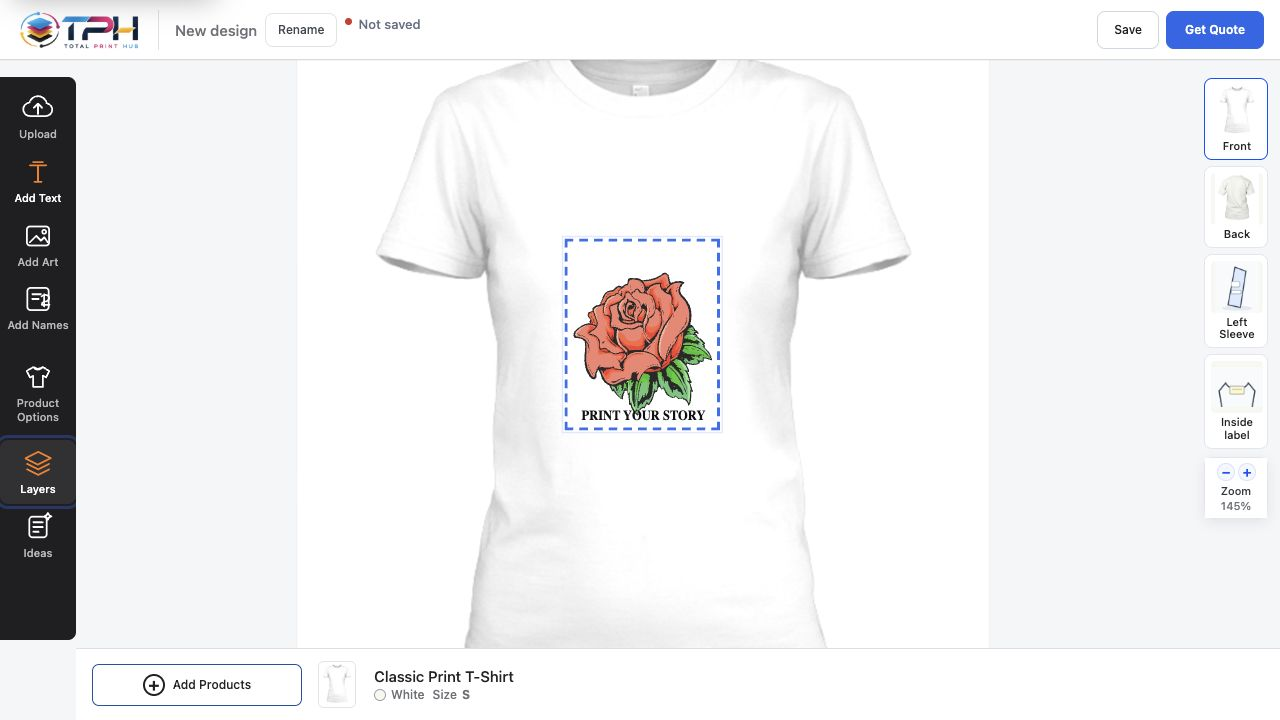
What the customer does
- 1
Choose the product, color and size on your product page.
- 2
Open the designer from the product page.
- 3
Add text, artwork from your library, or an upload.
- 4
Choose the side and keep the artwork inside the print area.
- 5
Watch the price update as the design changes.
- 6
Save the design or add it to your cart.
Tools
- Text with fonts, alignment, outline, effects and layers
- Artwork search by category, from the library you publish
- Uploads: PNG, JPG, SVG, PDF, PSD, TIFF, WebP, GIF, BMP, AVIF, HEIC and AI (PDF-compatible) files
- Background removal, upscale and crop for uploads
- Resize, rotate, snap, align, group, duplicate and order
- Names & Numbers for team orders, priced as their own line
- Product sides, print areas, colors, zoom, undo and redo
Uploads that print well
Each upload's resolution is checked at the size it will print, so a small logo stretched across a full front is caught while the customer can still replace it. The same Studio opens on phones and tablets, with touch controls sized for fingers.
Saved work
Saved and ordered designs are listed under My designs in the Studio and reopen on the same product, so a customer can stop halfway and finish later. Your team sees the same design on the order in Production.
Switch it on
- 1
Open Settings > Customer Studio and find Customer experiences.
- 2
Switch on Product Studio, the Admin's name for the Design Studio.
- 3
Set up the product's print areas in Catalog > Products and its price in Catalog > Pricing.
- 4
Open Settings > Connections. The Product Studio card shows how many products are ready and what is still missing.